
1. Start with what you need
You might be opening Swell AI because you need a reliable list of the AI your organisation uses. You might have a particular proposal to assess, an approval to record, or a board asking how AI is being managed. You do not need to tackle all of those things at once.
You can start with the AI Register. You do not need to create a strategy, build a roadmap or prepare board reports before you begin.
Start by recording the AI uses you know about and the people responsible for them. Use assessments, specialist reviews, risks, controls and approvals to manage the work that needs closer attention. Add planning and reporting when they are useful to your organisation.
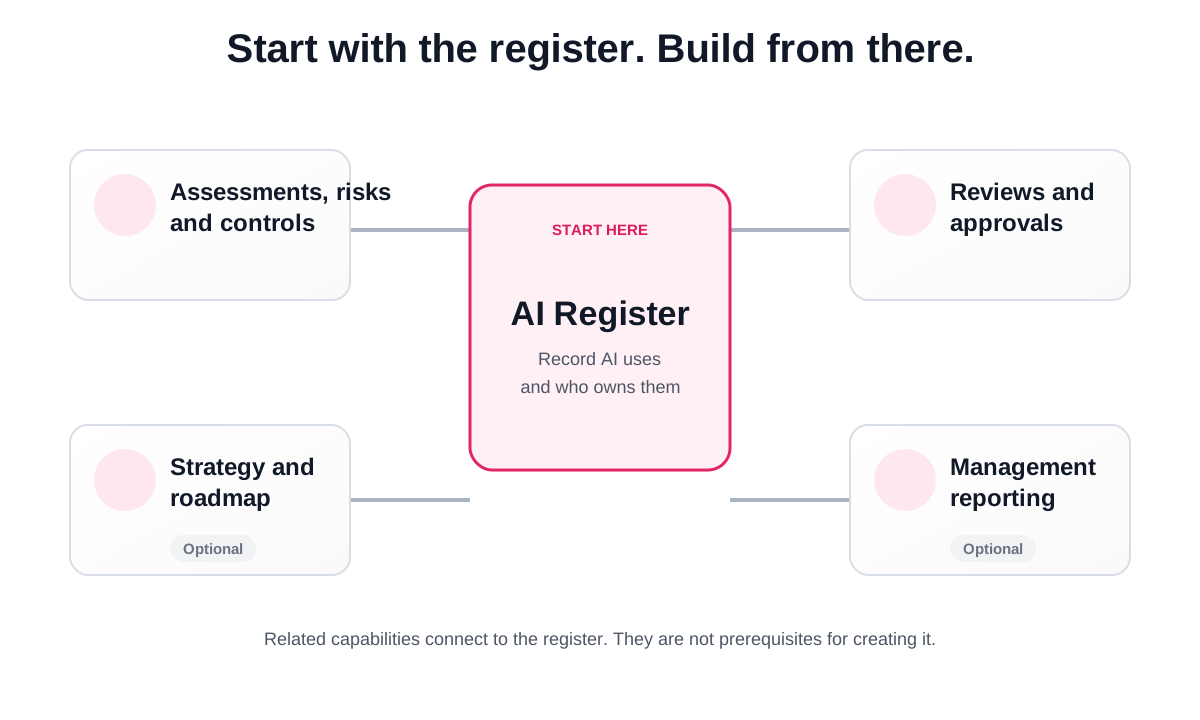
This guide explains how those activities fit together. It offers a practical starting point, not a compulsory implementation sequence. An organisation with an established strategy can begin there. A smaller team can start with a handful of registered uses and build from that.
You do not need to read the whole guide before doing your first task. Read the framework overview, then go to the section that matches your work. Open a work instruction for the exact steps, then return here to continue through the workflow.
Ready to begin? Register your first AI use (opens in a new tab).
2. Understand the Swell AI governance framework
The framework connects what you know about an AI use with the checks, safeguards and decisions it needs. It also keeps those decisions connected to later changes, incidents and reviews.
At its centre is a six-part lifecycle:
Register → Assess → Control → Approve → Monitor → Review
| Stage | The question you are answering |
|---|---|
| Register | What are we using AI for, and who is responsible? |
| Assess | What needs closer examination about this use? |
| Control | What safeguards do we need, and are they working? |
| Approve | Who can decide whether this use may proceed, and on what terms? |
| Monitor | What needs attention while the AI is being used? |
| Review | Do the information, safeguards and earlier decisions still make sense? |
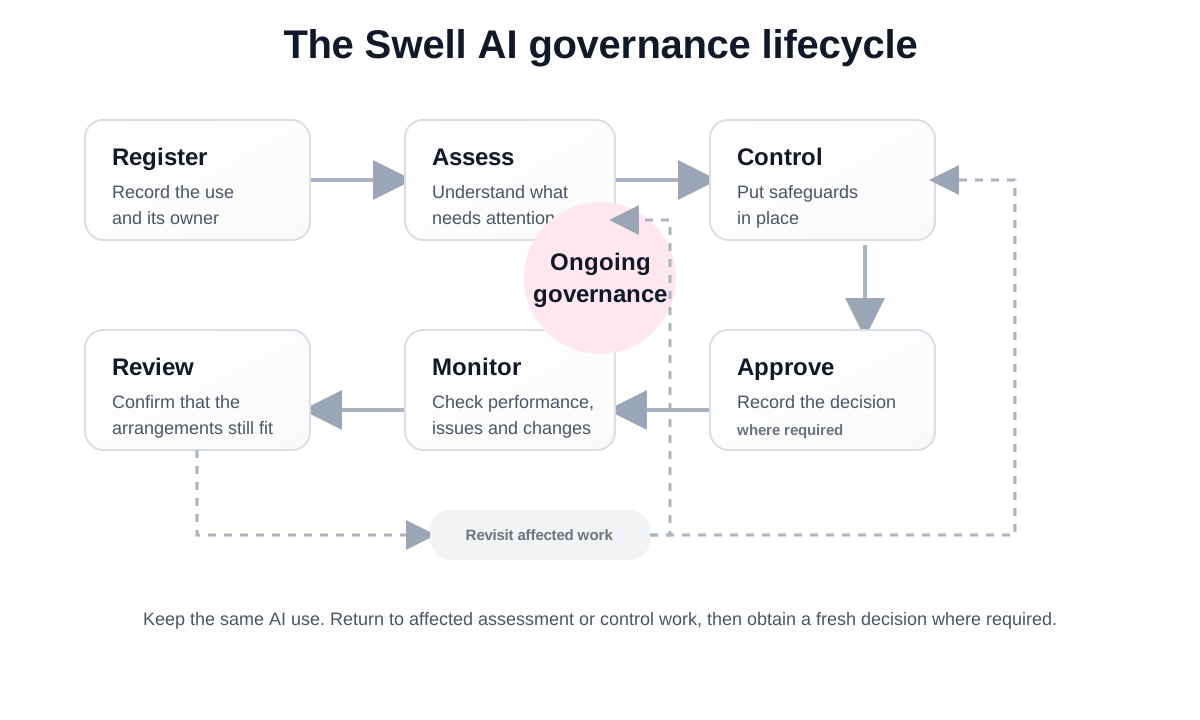
These stages explain related responsibilities. They are not six boxes you complete once and forget. You can be monitoring an existing use while reassessing a proposed change. A control may need ongoing checks after approval. An incident can require you to revisit an earlier decision.
The AI use is the starting point
Swell centres the work on a particular organisational use of AI, rather than on a product name alone.
For example, “Drafting responses to customer enquiries” describes a business activity. “AI assistant” only identifies a type of tool. To understand the activity, you also need to know what information it uses, who checks the drafts and whether it can send a response without a person approving it.
The same product might also be used to shortlist job applicants. That is a different use with different people, information and consequences. An assessment or approval for one use should not be treated as covering the other.
How information becomes governance work
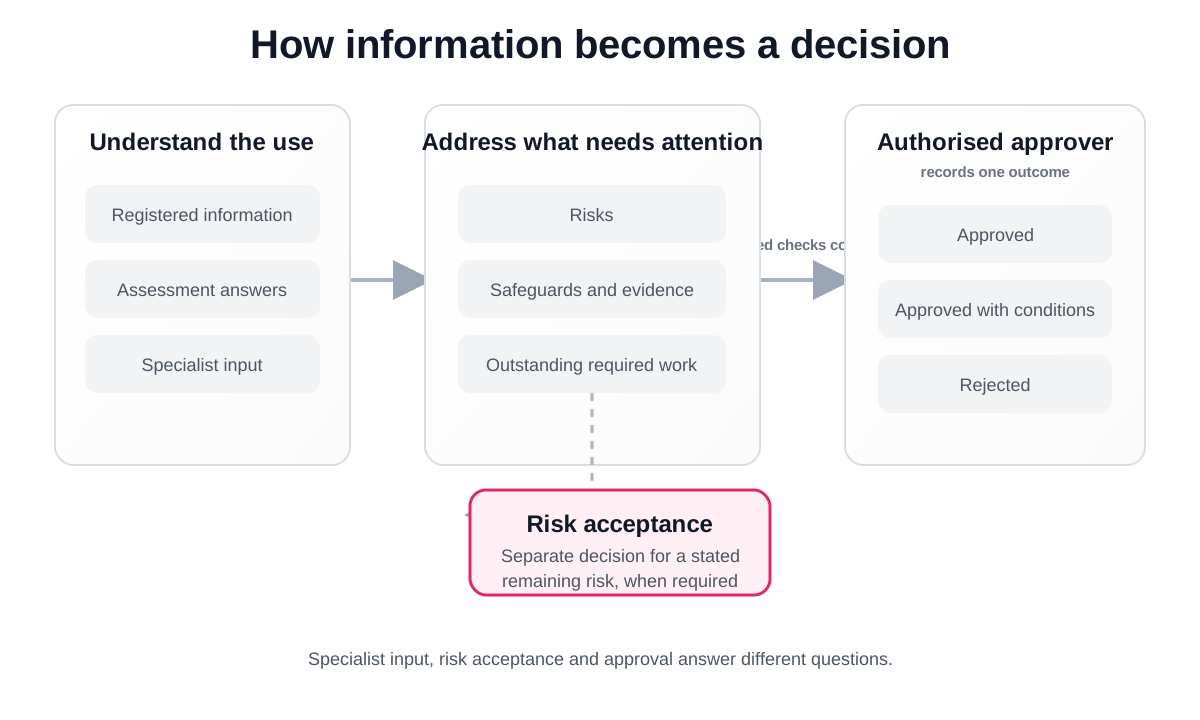
You record the facts about the use and answer the relevant assessment questions. Swell uses defined rules to identify risks, controls and review or approval requirements from that information. Where someone needs to confirm a specialist matter, the work is assigned to a named person.
You should be able to understand why a question or requirement matters. Read the explanations alongside the assessment and specialist requests. If an underlying fact is wrong, correct it through the appropriate process rather than working around the resulting requirement.
The system helps organise this work. People remain responsible for providing accurate information, judging the evidence and making authorised decisions.
For example, a customer service team might begin by drafting replies from approved reference material, with staff checking every response. A later proposal to connect the tool to customer records changes what needs to be examined. The earlier assessment should not simply be assumed to cover the new access.
Examples in this guide illustrate the process. They are not predetermined risk ratings or approval recommendations.
Operational status and governance status are different
An AI use may already be operating while its assessment is incomplete. It may also have approval for a trial that has not started yet.
Record what is happening in practice and review the outstanding governance work separately. Being listed as in use does not establish that approval has been granted. Completing an assessment does not show that a planned rollout has happened.
Who does what?
The people involved depend on the use and the work required. These are responsibilities, not a requirement to create a separate permanent role for every person.
| Responsibility | What it involves |
|---|---|
| Organisation administrator | Maintains organisation details and manages access. |
| Governance coordinator | Helps keep records, assignments and follow-up work moving. |
| Business owner | Explains the purpose of the AI use and remains accountable for its use in the business. |
| Specialist reviewer | Provides a conclusion on a particular area, such as privacy or security. |
| Risk or control owner | Manages an assigned risk or carries out and evidences a safeguard. |
| Approver | Makes the organisational decision assigned to them, within their authority. |
One person may carry several responsibilities where permitted. Some decisions need an independent reviewer or approver. Administrative access is not a substitute for that authority.
Work instructions: Understand the governance lifecycle (opens in a new tab) · Understand access and assigned responsibilities (opens in a new tab).
3. A practical way to get started
The following approach is useful when you are starting with an empty register. Adapt it to the information and processes you already have.
Set up a small initial team
Check your organisation details and invite the people who will help establish the register. This may be a governance lead, a technology contact and one or two business owners. You do not need to invite the whole organisation immediately.
Agree who will coordinate the initial work, who will check incomplete records and who can help answer technical questions. Keep administrative access limited to the people who need it. Invite additional specialists and decision-makers as their work arises.
Work instructions: Check organisation details (opens in a new tab) · Invite people (opens in a new tab).
Find out where AI is already being used
Start with the teams and systems you know. Ask about AI being considered, tested or used in everyday work. Include AI features within existing software, not just products bought specifically for AI.
You can gather this information through conversations, questionnaires or your existing discovery process. Ask what people do with the technology, not simply whether they have an AI licence.
Keep confirmed use separate from a possibility that still needs checking. Knowing that a software package includes an AI feature does not tell you whether your organisation has enabled or used it.
If you have an existing spreadsheet or list, check the information before registering the uses in Swell. Start with the records you can confirm.
Work instructions: Describe an AI use (opens in a new tab) · Record the product and supplier (opens in a new tab).
Register a manageable first group
Begin with uses you can describe accurately. Give each one a recognisable name, explain its purpose and identify the responsible business area and owner. Record who uses it, who might be affected and how people remain involved.
Do not delay the whole register because a few details need confirmation. Use the available uncertainty options or save a draft. Make it clear which information still needs follow-up.
A useful first milestone is a small register that colleagues recognise and can maintain. The number of entries matters less than whether each entry describes a real use and has someone responsible for it.
Work instructions: Register an AI use (opens in a new tab) · Resume a draft (opens in a new tab).
Check ownership and information quality
Ask the relevant owners to review the first records. Look for vague descriptions, missing ownership, outdated information and records that appear to describe the same use.
Resolve suspected duplicates through the available record-management process. Do not remove a record with assessment or decision history simply to tidy the list.
Where the same product supports several materially different purposes, keep those uses distinct. Where several teams genuinely share one use, describe that scope clearly and agree who is accountable.
Work instructions: Find an existing AI use (opens in a new tab) · Update an AI use (opens in a new tab).
Decide what needs attention first
Review the questions and attention items raised during registration. Consider the significance of each use, including the information involved, the people affected, the actions it can take and any uncertainty that matters to a decision.
You can organise the assessment workload in stages. That does not mean postponing a required check for a use that needs authorisation before it proceeds. Deal promptly with urgent concerns and follow your organisation's rules about continuing, restricting or pausing use.
Use Overview to see where attention is needed and My actions to find assigned work. Keep the focus on the next useful action rather than trying to make every dashboard count reach zero immediately.
Work instructions: Use Overview (opens in a new tab) · Work from My actions (opens in a new tab) · Start an assessment (opens in a new tab).
4. You do not have to use everything
Choose the parts of Swell that support the work you need to do. There is no requirement to complete a strategy or roadmap before the register becomes useful.
Start with the register
Use Swell to record where AI is used, why it is used and who owns it. Keep those records accurate as you learn more. This is a useful starting point even while other governance activities continue through your existing processes.
Manage governance in Swell
Use assessments, specialist input, risk management, controls and approval records when you need to manage that work in Swell. Different AI uses can be at different stages. You do not need to bring the whole register through an assessment at the same time.
Add planning or reporting
Use Strategy and Roadmap to connect AI activity to business priorities. Use reporting when management needs a view of the recorded information. These are separate choices. Preparing a report does not require you to build a roadmap first.
Optional features are different from required checks. Choosing not to use Strategy and Roadmap does not prevent you from registering or governing an AI use. It also does not remove an assessment, specialist review, control or approval requirement that applies to that use.
You can decide how much of your work to manage in Swell. Your organisation's policies and decision-making responsibilities still apply.
5. How the lifecycle works in practice
Register: describe the actual use
Registration gives you a common record to work from. Someone outside the team should be able to read it and understand what the AI does, the business reason for using it and the people involved.
A useful description might be:
The customer service team uses an AI assistant to prepare draft responses from approved reference material. Staff check the content and decide what to send. The tool does not send replies itself.
That is more useful than “AI for productivity”. It identifies the activity, the information source and the human decision.
Record the intended benefit as well. A practical measure might be the time needed to prepare a checked response, alongside the number of corrections required. The benefit is something to test, not an achievement to assume.
Registration includes early questions about matters that may need attention. These screening answers are not the same as a completed assessment or an approval. Review the next actions shown for the use.
Work instructions: Register an AI use (opens in a new tab) · Record expected benefits (opens in a new tab) · Complete initial triage (opens in a new tab).
Assess: understand what needs closer examination
Assessment examines the use in more detail. You review the information already recorded and answer questions about how it works, what information it handles, who it affects and how people oversee it.
Describe current practice. If a safeguard is planned but has not been implemented, do not describe it as already operating. If an answer depends on a supplier or specialist, obtain that information rather than choosing the most reassuring answer.
Swell can identify specialist requirements from the assessment. The assigned reviewer considers the question within their expertise and can request missing information. You do not need to be a privacy, security and legal expert to coordinate an assessment.
A specialist conclusion contributes to the assessment. It is not the final approval of the AI use. When required input is outstanding, review who has the task and what they need before following up.
Once the outcome is available, read the identified risks and required work. Understanding why something was raised is more useful than looking only at its label or rating.
Work instructions: Complete an assessment (opens in a new tab) · Assign a specialist (opens in a new tab) · Request more information (opens in a new tab) · Record a specialist conclusion (opens in a new tab).
Control: manage risks and put safeguards into practice
A risk describes what could go wrong and why it matters. A control is a safeguard intended to prevent the problem, detect it or reduce its consequences. A treatment action is work you undertake to manage the risk.
For the customer service example, an inaccurate draft could lead to incorrect advice being sent. A safeguard might require a trained staff member to check each answer against an approved source before sending it. Testing would need to establish whether that check works in practice.
Assign responsibility for each risk and for the work needed to manage it. The person accountable for a risk may not be the person who implements every control.
Inherent risk considers the risk before allowing for the controls being assessed. Residual risk is the risk remaining after taking account of controls that can genuinely be relied on. Swell provides a 3×3 likelihood and consequence matrix, with documented judgements supporting the ratings.
A control being listed is not enough. Check that it has been implemented, that the evidence is relevant and current, and that it works for the particular use. Training records, approved procedures, configuration records and test results are examples of evidence, depending on the control.
When the controls or evidence change, review the risk rating. Do not assume that creating a control or completing an action automatically makes the remaining risk acceptable.
When risk acceptance is needed
Risk acceptance is a separate decision about whether the organisation is prepared to accept a stated remaining risk. It should identify the risk, the reasoning, the authorised decision-maker and any conditions.
Choosing Accept as a treatment approach is not the same as having the acceptance request approved. Likewise, accepting one risk does not approve the whole AI use.
Work instructions: Assign a risk owner and treatment (opens in a new tab) · Add and review controls (opens in a new tab) · Review control evidence (opens in a new tab) · Confirm a risk rating (opens in a new tab) · Request risk acceptance (opens in a new tab).
Approve: make a decision about a defined use
Where formal approval is required, the authorised approver reviews the purpose, assessment, specialist conclusions, risks, controls and evidence. They need to understand what they are being asked to permit and what remains unresolved.
Approval should be specific. A decision for a six-week trial involving five staff and approved reference material should not be read as permission for an organisation-wide rollout using customer records.
Swell records approval, conditional approval or rejection through the approval workflow. Conditions need clear actions, owners and dates. They should distinguish work needed before operation from follow-up permitted afterwards.
Do not use a condition or a note to bypass a mandatory prerequisite. If the approval is not ready, resolve the outstanding work through the relevant process.
An approval records an organisational decision based on the information considered. It is not a guarantee that the use is safe, compliant or free from risk. Later changes may require a fresh decision.
Work instructions: Review the approval brief (opens in a new tab) · Assign an approver (opens in a new tab) · Record the decision (opens in a new tab) · Complete an approval condition (opens in a new tab).
Monitor: pay attention while the AI is being used
Monitoring is the routine work of checking whether the use continues as expected. Depending on the activity, that may involve checking outputs, reviewing complaints, testing safeguards, watching for supplier changes and following up on conditions.
Agree who carries out those checks and how they raise a concern. The business owner should know what information they need from the people operating the AI.
Use Swell to track the relevant governance work and record incidents or material changes. The actual operational checks may happen in other systems. A governance dashboard should not be treated as evidence that every output or connected system is being monitored automatically.
For the customer service example, monitoring could include reviewing corrections made by staff and looking for recurring errors. If the proposed benefit is not appearing, review the usefulness of the tool as well as its risks.
Work instructions: Review monitoring status (opens in a new tab) · Report an incident (opens in a new tab) · Record a material change (opens in a new tab).
Review: check whether the earlier conclusions still hold
A review is a deliberate check of the whole use, rather than an isolated update to one field. Ask whether the purpose, information, users, supplier, safeguards and approval still describe what is happening.
Also ask whether the use is delivering a worthwhile benefit, whether incidents have revealed weaknesses and whether the people responsible are still the right people.
Agree review timing that reflects the use and your organisation's requirements. Review sooner when something significant changes. You do not need to wait for a scheduled date to examine a new risk.
A review might confirm that the existing arrangements remain suitable. It might also lead to updated facts, fresh specialist input, revised controls, reassessment, reapproval or a decision to stop the use.
Current availability: The periodic-review guide describes the review information and actions currently available. If an assigned review cannot be opened or completed, contact support. Continue necessary reviews through your organisation's existing process, retain the outcome and record any resulting changes through the supported Swell workflows. Do not mark an unfinished task as complete merely to clear it from outstanding work.
Work instructions: Check periodic-review guidance (opens in a new tab) · Complete a reassessment (opens in a new tab) · Complete reapproval (opens in a new tab).
6. Add strategy, roadmap and reporting when they are useful
Connect AI activity to business priorities
You do not need a separate AI strategy before using Swell. When you are ready to use Strategy and Roadmap, start with what your organisation is trying to achieve.
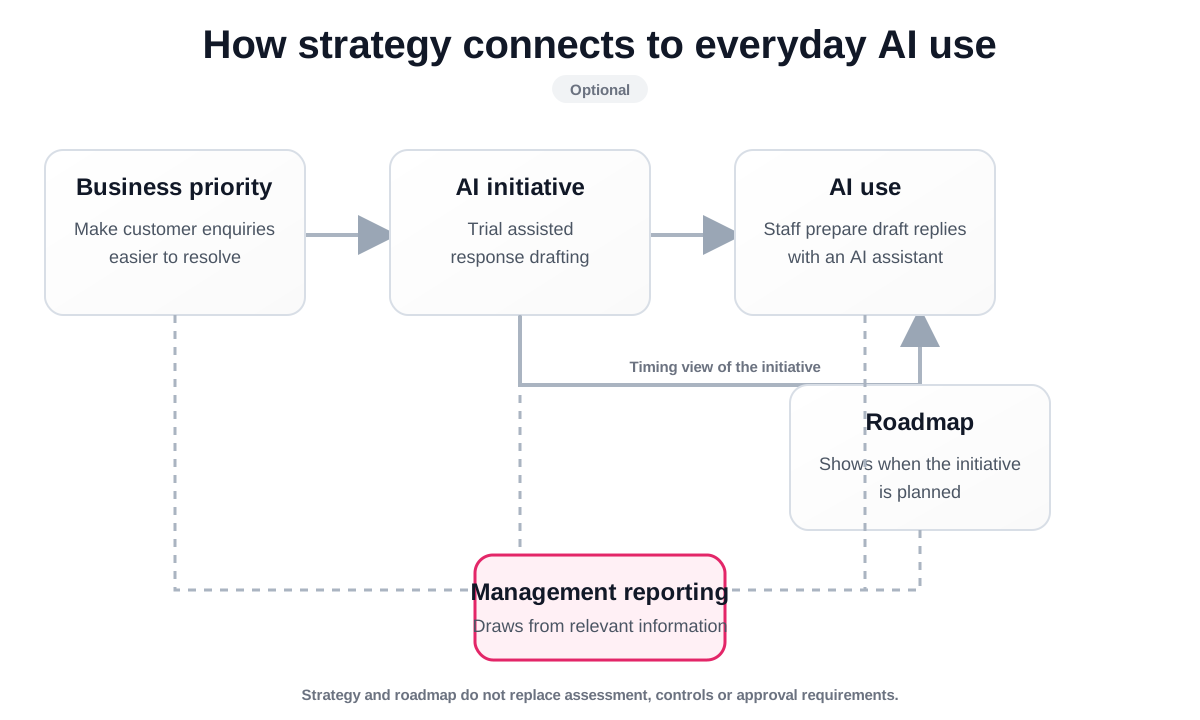
A strategic priority describes a business outcome. An initiative describes the work intended to support it. An AI use describes the particular use of technology that needs to be governed.
For example, a priority might be “Make customer enquiries easier to resolve”. An initiative might be “Trial assisted response drafting”. The registered AI use would explain how the customer service team actually uses the assistant.
These records serve different purposes. Completing an initiative does not establish that every associated AI use has approval. Linking a use to a priority explains why it matters, not whether its risks are acceptable.
You can enter an existing strategy early or develop these links after you understand your current AI activity. Do not create artificial priorities or links simply to fill an empty section.
Work instructions: Understand priorities, initiatives and uses (opens in a new tab) · Add a priority (opens in a new tab) · Create an initiative (opens in a new tab) · Link AI uses (opens in a new tab).
Use the roadmap to explain timing
The roadmap shows initiatives against their planned quarters. Keep dates, ownership and status consistent with the agreed delivery plan.
Use it to discuss what is planned, what is underway and what has changed. When an initiative moves or pauses, update the initiative rather than leaving an old plan in place for reporting.
If another system already holds your detailed project plan, decide what summary information belongs in Swell. You do not need to duplicate every project task.
Work instructions: Use the Roadmap (opens in a new tab) · Edit an initiative (opens in a new tab) · Review progress and alignment (opens in a new tab).
Report what you know, including the gaps
You do not need a finished register before you prepare a useful report. An early report can explain what has been identified, what remains incomplete and what management needs to decide. Make the limits of the information clear.
Choose the report pages relevant to your audience. Use the management statement to explain significant developments, outstanding concerns and the next actions. Do not describe an absence of recorded incidents as proof that no incidents occurred.
Preview the report and correct any inaccurate source records before creating it. Once created, the report snapshot preserves what was reported at that time. A correction needs a new snapshot, with a clear explanation where necessary.
Report packs currently download as a ZIP file containing an image for each selected page. Strategy information is not a prerequisite for selecting the other relevant report pages.
Work instructions: Configure a report (opens in a new tab) · Preview the report (opens in a new tab) · Create a snapshot (opens in a new tab) · Retrieve or download a report (opens in a new tab).
7. Keep the work current during day-to-day operation
Once the initial records exist, you do not restart the whole process every time something happens. Follow the process that matches the event and revisit the parts affected.
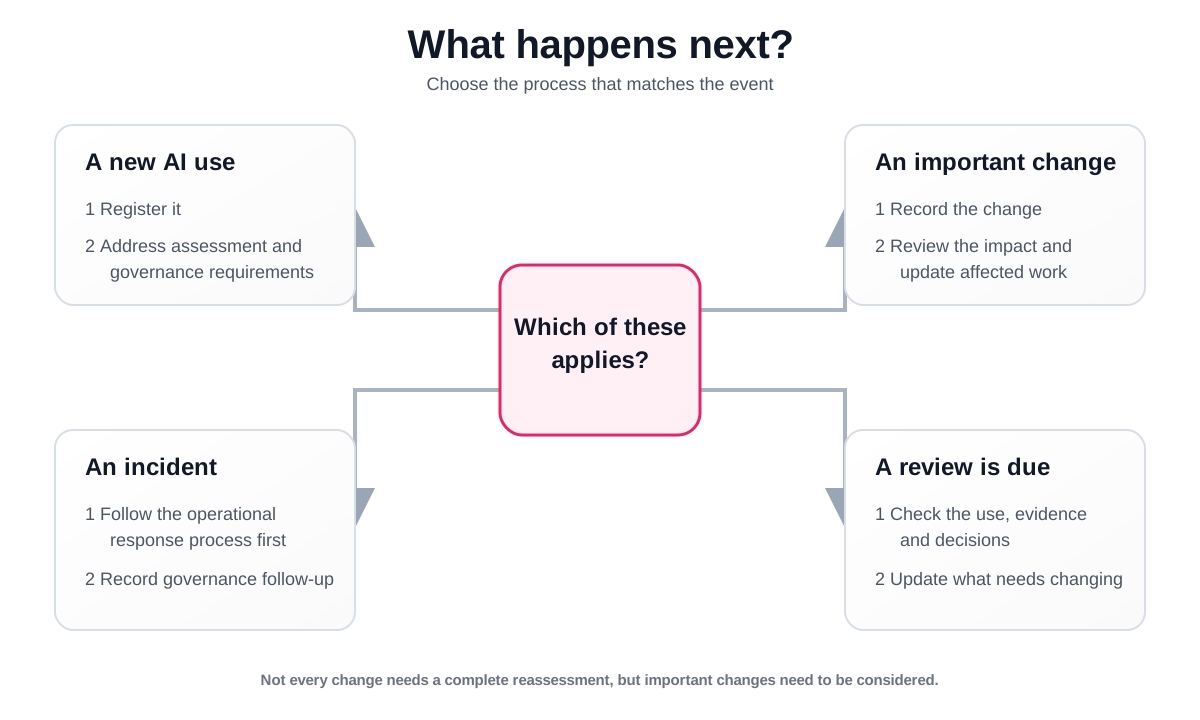
A new use is proposed or discovered
Check whether it is already recorded. Register a genuinely new use, assign ownership and review the assessment or approval work it needs. For a use already operating, record the present facts and address outstanding requirements. Registration does not retrospectively authorise it.
Work instruction: Register an AI use (opens in a new tab).
Something important changes
Record a material change when the purpose, supplier, model, data, access, users or capability changes enough to affect earlier conclusions. Explain what changed and when.
The review determines what needs updating or reconsidering. Recording a change does not itself update all the facts on the AI use. Check both the change record and the underlying information.
Work instructions: Record the change (opens in a new tab) · Review its impact (opens in a new tab).
Something goes wrong
Follow your organisation's operational, security, privacy or safety response first. Record the AI-related incident in Swell so its governance implications can be reviewed. Include what is known, the apparent severity and the immediate action taken.
Do not wait for a complete investigation before raising a concern. Update the record as facts become clearer. Operational recovery and completion of governance follow-up are separate matters.
Work instructions: Report an incident (opens in a new tab) · Review the incident (opens in a new tab) · Close an incident (opens in a new tab).
A safeguard or risk changes
Review the control evidence and effectiveness, then reconsider the remaining risk. Check whether an earlier acceptance or approval relied on the safeguard that changed. Escalate any effect on continued use to the appropriate decision-maker.
Work instructions: Review control effectiveness (opens in a new tab) · Update the risk rating (opens in a new tab).
A person changes role or leaves
Update ownership and review their open assignments. Transfer work to authorised people through the relevant processes. Manage account access separately and preserve the names on earlier decisions.
Work instructions: Manage member access (opens in a new tab) · Reassign an approver (opens in a new tab) · Reassign a specialist review (opens in a new tab).
A review or reporting date approaches
Ask owners to check significant changes, unresolved actions, evidence and approaching deadlines. Review priorities and initiatives too if you use those features. Prepare the report from updated records and explain unresolved gaps rather than hiding them.
Agree a routine that fits your organisation. You might check urgent work daily, review outstanding actions weekly and prepare management reports monthly or quarterly. These are examples, not Swell requirements. Time-sensitive incidents, conditions and decisions should not wait for a routine meeting.
Work instructions: Review organisation actions (opens in a new tab) · Check periodic-review guidance (opens in a new tab) · Prepare a report (opens in a new tab).
8. What good AI governance looks like in practice
A useful framework helps people make and carry out sound decisions. It needs more than forms. The following principles can help you decide whether your own arrangements are working.
Know what you are trying to achieve
Be clear about the intended benefit and how you will check it. A tool being available is not, by itself, a reason to introduce it. Consider whether the proposed use is suitable for the task and the people affected.
Make responsibility clear
People should know who owns the use, who provides advice, who makes decisions and who handles a problem. Give them enough time, knowledge and authority to carry out those responsibilities. A name in a register is only the starting point.
Match the checks to the use
Consider the possible impact, the information involved, the people affected and the uncertainty. Concentrate effort where it matters, while keeping basic expectations clear for everyone. Proportionate governance does not mean overlooking a mandatory requirement.
These themes are reflected in the National AI Centre's Essential AI practices.
Make oversight practical
Decide what a person must check, when they can intervene and what happens if they disagree with the AI output. Train people for that responsibility. “A human is involved” is not a sufficient description of how oversight works.
Consider the people affected
Think about privacy, fairness, accessibility and the consequences of mistakes. Provide an appropriate way for affected people to understand the role of AI, raise concerns and seek review of significant decisions. Consult the people who understand the affected work, not only the people implementing the technology.
Keep enough evidence to explain a decision
Record the information considered, the reasoning, the decision-maker and any limits. Keep supporting documents accessible to the people who need them, without copying sensitive information unnecessarily. Preserve earlier decisions when new facts lead to a different conclusion.
The OECD AI Principles discuss human oversight, transparency, accountability and the ability to trace decisions across the AI lifecycle.
Test assumptions and keep learning
Check that safeguards work before relying on them. Use monitoring, incidents and reviews to challenge earlier assumptions. Consider supplier changes as well as changes made by your own team.
Fit AI governance into existing management
Connect the work with your existing risk, procurement, information security, privacy, incident and approval processes. Decide where each record belongs and who maintains it. Swell can support the AI governance record without replacing every other business system.
The NIST AI Risk Management Framework provides voluntary guidance for managing AI risk throughout design, development, use and evaluation.
These references are useful background. This guide is not a certification or a claim that using Swell satisfies every requirement of an external framework. Your organisation still needs to determine the policies, obligations and specialist advice relevant to its activities.
9. Common real-world situations
Our committee makes the approval decision. Who records it?
The committee can consider the proposal through its normal meeting and decision process. An authorised chair or representative can then record and give effect to its decision in Swell under their own account.
Identify the committee, meeting date, resolution and approved scope in the rationale. Record conditions through the available approval process and retain the relevant minutes or decision extract in the appropriate records system.
For example:
Recorded by the authorised committee chair following the AI Governance Committee meeting on [date], resolution [reference]. The committee approved the six-week trial described in [assessment reference], subject to the conditions recorded with this decision.
This preserves the distinction between the committee's decision and the individual who records it. Swell does not collect committee votes or verify quorum. If your organisation requires separate individual decisions, a chair's note does not replace them.
Work instruction: Record an approval decision (opens in a new tab).
The approver is unavailable, or there is a conflict of interest
Reassign the work to another authorised person through the supported process. Follow your organisation's delegation or conflict procedure and retain the reason for the change. Do not share an account or give someone administrative access merely to get a decision through.
Work instruction: Assign or reassign an approver (opens in a new tab).
Several teams or an external specialist need to contribute
Identify which contributions are supporting information and which are formal specialist conclusions. Use information requests for specific missing facts and assign specialist work to the people qualified to complete it.
Before inviting an external reviewer, check confidentiality and access arrangements. An external report can support a review, but storing it does not automatically complete a required confirmation.
Work instructions: Invite a specialist (opens in a new tab) · Request information (opens in a new tab).
We already use the AI, or approved it before adopting Swell
Record how it operates now. Keep any original approval evidence, including its actual date, decision-maker, scope and conditions.
Do not backdate a new decision or present an old one as though it was made in Swell today. Use the current record fields and evidence references accurately. Where a fresh decision is required, make clear that it is a current review of an existing use.
If the use has never been approved where approval is required, ask the appropriate authority whether it must pause or operate under restrictions while the work is completed.
Work instructions: Register an existing use (opens in a new tab) · Review the approval process (opens in a new tab).
We only want to approve a pilot
Define the permitted purpose, users, information, duration and restrictions. Explain what must be checked before the pilot expands or moves into routine operation.
Record any conditions and the people responsible for them. Arrange follow-up through the supported workflow and your normal governance process. Do not assume that an approval date in Swell automatically disables the underlying AI tool when the period ends.
Work instructions: Record the pilot decision (opens in a new tab) · Manage conditions (opens in a new tab).
The supplier will not provide the evidence we requested
Record what you asked for, what was supplied and what remains unknown. Have the relevant reviewer assess the significance of the gap and what can be done about it.
Do not replace missing evidence with an assumption that the requirement is met. Where a formal requirement prevents progress, use an authorised process for resolving it rather than writing a note that bypasses it.
Work instructions: Record product and supplier information (opens in a new tab) · Request missing information (opens in a new tab).
A control cannot be completed on time
Tell the owner and the relevant coordinator or decision-maker before the deadline where possible. Explain the delay, the effect on risk and the proposed next steps.
A new date is not necessarily permission to continue operating. Check whether the control is a prerequisite for approval or use. Do not mark it complete until the required work and evidence are genuinely complete.
Work instruction: Complete a control assignment (opens in a new tab).
Our evidence and incidents are already managed elsewhere
Keep the authoritative documents or operational incident record in the system your organisation uses for that purpose. Record an approved reference in Swell and capture the AI-specific decisions and follow-up.
For evidence, identify the relevant document or version and ensure reviewers can access it. For an incident, agree which system holds the investigation and which information needs to be reflected in Swell. Avoid two competing versions of the same event.
Work instructions: Provide control evidence (opens in a new tab) · Record an incident (opens in a new tab).
Another department wants to use an approved product
Compare its proposed use with the scope already assessed. The product may be the same while the information, purpose, people and consequences are different.
Register a materially different use separately. Where an existing use is expanding, review whether that is a material change. Reuse relevant evidence where appropriate, but do not assume the earlier approval covers the new activity.
Work instructions: Register a new use (opens in a new tab) · Record a material change (opens in a new tab).
We are pausing or retiring an AI use
Update the record to reflect the actual situation using the lifecycle options available. Review open risks, actions and conditions, and decide what follow-up remains necessary.
Arrange access removal, integration changes, supplier arrangements and information handling through the relevant operational processes. Changing the Swell record does not switch off the underlying technology. Preserve the governance history rather than deleting it to make the register look tidy.
Work instructions: Update an AI use (opens in a new tab) · Review monitoring and lifecycle information (opens in a new tab).
A task is blocked and I do not know why
Read the message on the task and check the assignment, outstanding information and permissions. You may be able to view a record without being authorised to complete its decision.
Ask the coordinator to resolve the assignment or missing work. Contact support when the page does not explain the problem. Do not change answers, roles or completion states just to make the blocker disappear.
Work instructions: Understand assigned responsibilities (opens in a new tab) · Request help (opens in a new tab).
10. Choose your next step
You do not need to finish everything described in this guide before making progress. Choose the task that addresses your current need.
| Your next task | Work instruction |
|---|---|
| Set up the people who will help | Invite people (opens in a new tab) |
| Record your first use of AI | Register an AI use (opens in a new tab) |
| Understand work assigned to you | Use My actions (opens in a new tab) |
| Examine a use in more detail | Start an assessment (opens in a new tab) |
| Provide specialist input | Review your assignment (opens in a new tab) |
| Manage a risk | Assign ownership and treatment (opens in a new tab) |
| Make an approval decision | Review the approval brief (opens in a new tab) |
| Deal with an incident or change | Choose the right process (opens in a new tab) |
| Plan AI activity | Understand strategy and initiatives (opens in a new tab) |
| Prepare information for management | Configure a report (opens in a new tab) |
| Resolve an account or support issue | Account, help and support (opens in a new tab) |
Start with accurate records and clear ownership. Keep the decisions and follow-up work connected to the actual use. Add the planning and reporting that your organisation needs.